VintaSoft Imaging .NET SDK 15.1: Documentation for .NET developer
Vintasoft.Imaging.Wpf.UI Namespace / WpfAnimatedImageViewer Class
Members Object Syntax Example Hierarchy Requirements SeeAlso
In This Topic
WpfAnimatedImageViewer Class
In This Topic
Viewer control for displaying the animation from images.
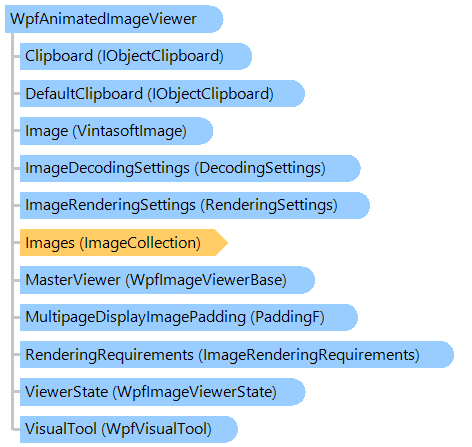
Object Model
PaddingF WpfVisualTool VintasoftImage WpfImageViewerState RenderingSettings ImageRenderingRequirements DecodingSettings ImageCollection WpfImageViewerBase IObjectClipboard IObjectClipboard WpfAnimatedImageViewer
Syntax
'Declaration

<DefaultEventAttribute("ScrollChangedEvent")>
<LocalizabilityAttribute(Ignore)>
<TemplatePartAttribute("Name = PART_HorizontalScrollBar", "Type = System.Windows.Controls.Primitives.ScrollBar")>
<TemplatePartAttribute("Name = PART_VerticalScrollBar", "Type = System.Windows.Controls.Primitives.ScrollBar")>
<TemplatePartAttribute("Name = PART_ScrollContentPresenter", "Type = System.Windows.Controls.ScrollContentPresenter")>
<DefaultPropertyAttribute("Content")>
<ContentPropertyAttribute("Content")>
<StyleTypedPropertyAttribute("Property = FocusVisualStyle", "StyleTargetType = System.Windows.Controls.Control")>
<XmlLangPropertyAttribute("Name = Language")>
<UsableDuringInitializationAttribute("Usable = True")>
<RuntimeNamePropertyAttribute("Name = Name")>
<UidPropertyAttribute()>
<TypeDescriptionProviderAttribute("TypeName = MS.Internal.ComponentModel.DependencyObjectProvider")>
<NameScopePropertyAttribute("Name = NameScope", "Type = System.Windows.NameScope")>
Public Class WpfAnimatedImageViewer
   Inherits WpfImageViewer

[DefaultEvent("ScrollChangedEvent")]
[Localizability(Ignore)]
[TemplatePart("Name = PART_HorizontalScrollBar", "Type = System.Windows.Controls.Primitives.ScrollBar")]
[TemplatePart("Name = PART_VerticalScrollBar", "Type = System.Windows.Controls.Primitives.ScrollBar")]
[TemplatePart("Name = PART_ScrollContentPresenter", "Type = System.Windows.Controls.ScrollContentPresenter")]
[DefaultProperty("Content")]
[ContentProperty("Content")]
[StyleTypedProperty("Property = FocusVisualStyle", "StyleTargetType = System.Windows.Controls.Control")]
[XmlLangProperty("Name = Language")]
[UsableDuringInitialization("Usable = True")]
[RuntimeNameProperty("Name = Name")]
[UidProperty()]
[TypeDescriptionProvider("TypeName = MS.Internal.ComponentModel.DependencyObjectProvider")]
[NameScopeProperty("Name = NameScope", "Type = System.Windows.NameScope")]
public class WpfAnimatedImageViewer : WpfImageViewer

Example

This C#/VB.NET code shows how to show animation from GIF image file in WpfAnimatedImageViewer.


''' <summary>
''' Shows animation in animated image viewer.
''' </summary>
''' <param name="viewer">An animated image viewer.</param>
''' <param name="filename">The filename.</param>
Private Sub StartAnimation(viewer As Vintasoft.Imaging.Wpf.UI.WpfAnimatedImageViewer, filename As String)
    ' if image collection of the image viewer is not empty
    If viewer.Images.Count > 0 Then
        ' clear the image collection of the image viewer
        viewer.Images.ClearAndDisposeItems()
    End If
    ' open the file
    viewer.Images.Add(filename)
    ' start the animation
    viewer.Animation = True
End Sub


/// <summary>
/// Shows animation in animated image viewer.
/// </summary>
/// <param name="viewer">An animated image viewer.</param>
/// <param name="filename">The filename.</param>
private void StartAnimation(Vintasoft.Imaging.Wpf.UI.WpfAnimatedImageViewer viewer, string filename)
{
    // if image collection of the image viewer is not empty
    if (viewer.Images.Count > 0)
    {
        // clear the image collection of the image viewer
        viewer.Images.ClearAndDisposeItems();
    }
    // open the file
    viewer.Images.Add(filename);
    // start the animation
    viewer.Animation = true;
}

Inheritance Hierarchy

System.Object
   System.Windows.Threading.DispatcherObject
      System.Windows.DependencyObject
         System.Windows.Media.Visual
            System.Windows.UIElement
               System.Windows.FrameworkElement
                  System.Windows.Controls.Control
                     System.Windows.Controls.ContentControl
                        System.Windows.Controls.ScrollViewer
                           Vintasoft.Imaging.Wpf.UI.WpfImageViewerBase
                              Vintasoft.Imaging.Wpf.UI.WpfImageViewer
                                 Vintasoft.Imaging.Wpf.UI.WpfAnimatedImageViewer

Requirements

Target Platforms: .NET 10; .NET 9; .NET 8; .NET 7; .NET 6; .NET Framework 4.8, 4.7, 4.6, 4.5, 4.0, 3.5

See Also